
Last week I wrote Who Wants $17,000? Easy Savings. The premise is that I’d finally gotten fed up with rate increases so I decided to change my cell and internet plans. The $17,000 comes from investing the savings each month. Pretty sweet.
We Hate Change
Many of us hate change. Especially when we have something that works – why mess with it? And cellphones and home internet can be tricky. If it ain’t broke, don’t fix it.
I told myself this for a while as my rates crept up. Why change? It works. Also, my provider had been good to me. They paid off my cellphones when I switched and they gave me an upgraded modem when mine was struggling. And they had mostly onshore support so they were easy to talk to.
Blah, Blah, Blah. Is it worth $17,000?
Change
Reading up on MVNO (you have to read the first post to learn what these are), it struck me how cheap the alternative plans can be. Will a $15 per month unlimited data plan really work or will I have dead zones everywhere? I stream lots of music in the car. Will this still work?
But I decided to bite the bullet and make the swap.
I don’t want to spoil the surprise, but yes, after I changed, everything worked and I can’t tell the difference (other than my wallet being a bit heavier).
Cell
Cell plans went first. I did this on a Sunday night and was pleased that I could get a person to help both at T-Mobile (who I was leaving) and US Mobile (my new carrier).
And honestly, this was harder than it should have been. Do they make it hard so that we won’t switch? Maybe?
But with a little perseverance, I managed.
I made the mistake of changing my phone on day 1 and waiting until day 2 to change my wife’s phone. I would have spent less time moving both at once.
Getting T-Mobile to release the phone numbers was the problem. And as I mentioned, I’m sort of OK with this because it should be hard for someone to call up and get control of our phone number.
But it was a bit harder than necessary. It took several calls and there was a bit of mis-information.
New Service is a Piece of Cake
But once I had the number unlocked, this was easy.
I go to the new carrier’s website. I enter some basic info, I get some confirmation emails and text messages, then I get an email with a barcode that I scan to download an esim. Physical sim cards are mostly dead. Even my wife’s old iPhone 11 was able to handle an esim.
Next thing I know I’m calling, texting and browsing on my iPhone.
2 Problems
After the initial success, I ran into 2 issues.
First, text messages stopped working. It turned out I had somehow swapped back to an old esim. I switched this in the settings app and was back in business. It took me a few minutes and a couple of questions from Grok – who was a champ as always – and I was back online.
2nd, I was unable to turn on wi-fi calling. This is nice to have if we’re out of the US or if cell service is glitchy and we have wi-fi. But it’s not a must have.
I contacted US Mobile via chat and someone got right on it. I got chat messages and emails right away. Their support was outstanding. In the end, the problem was somewhat self-inflicted. My VPN was blocking the site I needed to go to after turning wi-fi calling on. Wi-fi calling requires us to enter our address for emergency 911 services. My VPN was blocking this page. VPN off, Wi-fi calling on, VPN back on. I just had to visit the site that one time to enter info and now I’m free to VPN to my heart’s content.
After starting on Sunday evening, 2 iPhones were up and running by 2pm on Monday. It would have been earlier, but my wife took her phone golfing and I couldn’t futz with it until she returned.
Internet
Internet was a smidge trickier as I was moving from wireless (T-Mobile Home Internet) to wired (Verizon FIOS). A guy needed to come out and run a wire to my house, and then install the new gear. Since I haven’t had cable or used any of the connectors in years, all of the old coax stuff was buried in the walls. No problem, they ran the cable in from the street to the basement and I set up my wifi router there.
The basement?
Doesn’t sound like a good spot.
But fear not, I have Google mesh wi-fi – 3 little marshmallows that provide whole-house coverage.
Uh Oh
I add Marshmallow 1 and everything is great. Wi-fi works but signal is sketchy. Totally what I expected, so I’ll install the other 2 on the 1st and 2nd floor like before and we’ll be good to go.
I add marshmallow 2 and the system crashes. FIOS still sends a signal, but my home wi-fi network is down.
I called Verizon and they were available (on Saturday afternoon) and the guy on the other end had me take my phone to the modem and he could look through my phone’s camera to see that the FIOS modem was working. He performed a reset just in case but could tell that the system was online. I took his word for it because I remembered that my Google wi-fi sends me messages regularly that 1 point or other is offline.
I went back to Grok and he suggested that maybe the newer FIOS system was less tolerant of problems with my older Google wi-fi.
EERO
Some more discussion with Grok, and then ChatGPT when my free time with Grok expired, and I decided to get a new Amazon EERO system. I ordered Saturday around 4pm. It arrived Sunday at 4am. I waited until 6am to install.
Installation took 10 minutes. I’ve found Google to be very kludgey with any sort of change. Not so with EERO. It’s a delight.
Between the 12 hour free delivery and the ease of use of the EERO (by Amazon), remind me to buy some more Amazon stock.
Whole House?
I got creative and tried to place the EERO devices in better spots to improve my coverage throughout the house and yard.
In a huge surprise, after a day of moving and testing different spots, the devices ended up exactly where I had placed the Google devices.
And the EERO app is much more helpful than the old Google home app.
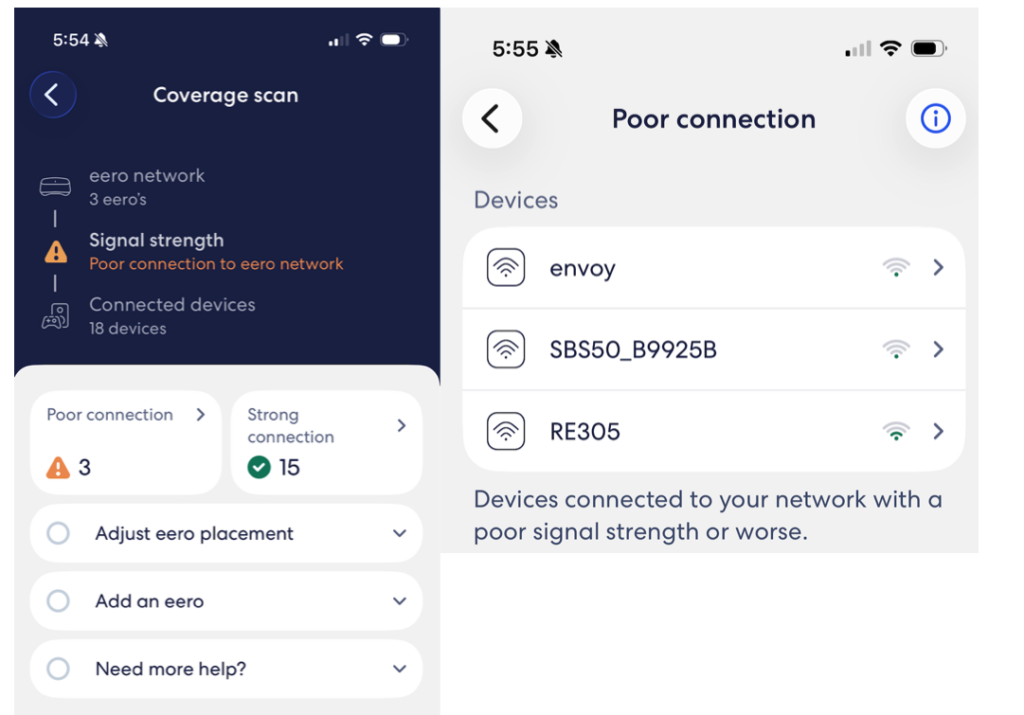
I can do a coverage scan to see how many devices are getting a good signal v. poor. I tap on the “poor connection” box and it shows me which ones.
Lucky for me, these 3 devices use very little bandwidth. They don’t need a strong signal. But all the important stuff has a great connection.
Worth it?
What’s it cost? Probably a couple of hours over a couple of days and some aggravation. If we did this every day we’d probably be able to do it in our sleep but once every several years or more, it can be a bit of a hassle.
But now I’m saving $5 per month on internet, and about $23 per line for 2 lines of cell service. That’s a total of $51 per month.
So, I’m saving money every month and there is absolutely no difference in my cell or home internet service. So yes, I think it is worth it.
Wrap Up
Most of us would rather not futz with something that’s working. We have enough to do.
But $51 per month is real money. Every month. And we tend to have cell and internet for many years.
I estimated savings over 20 years in the prior post, but some of us will likely have service much longer than that.
So for me, it is worth shopping for better options and putting in a little effort to make the change.
And if you’re really looking to save, try shopping for new car and home insurance.