
I love when I go to the doctor and I’m asked if I feel safe at home. It’s sad that this needs to be asked, but I still get a chuckle. Recently, I told the doctor that I got a bruise when my grandson beat me up. She got really serious until I explained that he was 3. Funny for me, but sad that this question needs to be asked.
But today’s topic is more about our online safety. We’ve talked about scam emails and texts, password managers, Apple’s fantastic hide my email service and other ways to protect ourselves and our wealth online.
But I really hadn’t thought much about the risks of my iPhone.
IOS 26
The annual operating system upgrade is here. Yay!
We get small changes over the course of the year, most of which contain important security enhancements, but we also get a few features here and there.
But September always brings a major upgrade with lots of new stuff.
And as usual, I downloaded right away.
Recovery Error
Gasp!
One of the new features of IOS 26 is an automated recovery system that will try to fix itself if an error occurs during install. In the past, we would need to connect our iPhone to a PC or Mac with a cable (can you believe it???) and correct the problem by initiating the download/reinstall via computer.
The good folks at Apple, in their enthusiasm to automate the world and rid us of pesky cables have now made iPhones that can fix themselves.
Or Not
I got the recovery notice on my iPhone screen and was prompted to run the scan. It found no errors so then I was prompted to enter some info and begin set-up.
I found myself in an infinite loop of running the scan, entering my passcode and wifi password, and returning back to the recovery screen.
After 10 tries, I searched for some help. Since IOS 26 is brand spankin’ new, I found very little.
Apple to the Rescue
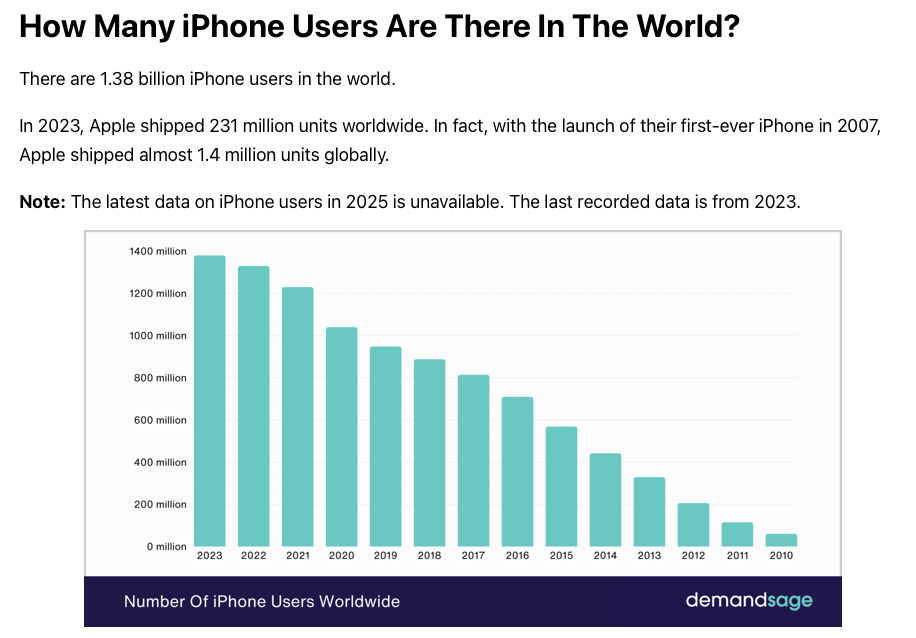
Despite the fact that there are 1.38 billion (with a “B”) iPhone users, it’s amazing that I can still get on a chat session with an Apple tech support person in about 15 seconds.
I spent close to an hour online and got a whole bunch of suggestions and we finally solved the problem.
In case you’re having the same problem, I had to force shut down the iPhone by holding the side button and then sliding the onscreen slider to shut down. Then I plugged the iPhone into my mac via USB/lightening cable and started the iPhone while holding down the side button.
The iPhone started in recovery mode and I was able to reinstall IOS via the finder app on my mac.
And again, several tries. I couldn’t restore from my iCloud back-up so I had to set up as a new phone.
But Anyway…
All that aside, the point is that I spent a large part of yesterday without my iPhone.
And while that would likely permanently damage anyone under 20, I’m 62. I’ve lived most of my life without a phone or even a computer. I can tough it out.
Here’s a list of some of the things that went south.
- No music in the car – I always listen to a playlist in the car. My car connects magically to my iPhone for this, so no phone means no music. Or directions…
- Starting the car. So, I have a key fob, but I touch my phone to the door handle and it magically opens. I put it in the charging tray and I can push the start button. I had to search for the key fob. Talk about antiquated.
- Garage door – have an app to open and close. I have buttons in the car and on the garage wall, but still…
- My home thermostat – It’s not cold yet, but that runs off of an app on my phone.
- My home internet and router – usually this runs by itself, but any troubleshooting or adjustments are made with the app.
- Solar – This is app only. Tesla app or Enphase app control the panels and the battery.
- Passwords – This was a biggee. I use a password manager. It’s a dream. Most of my passwords look like this: *y!jm!P2Y7sHtdU.U73e. Luckily I sprung for a password manager that syncs across my devices so I can access my passwords via the web, my mac, or my iPad. But, for the first few apps I had to reinstall on my iPhone, I had to manually enter passwords that look like this *y!jm!P2Y7sHtdU.U73e. Once I installed the password manager, I was fine, but lots of fat fingering before that.
So, there are a lot of conveniences on my phone. I can use an app to see my bank balance, but there are other ways to get that. But there are some things like the Tesla battery (that controls power to my home) that only work via a phone app.
Do I Feel Safe?
So this is what I’m starting to think about.
My phone controls a lot. Am I OK with that?
The Cost of Convenience
Opening the garage door with an app and not having to lug around a key to the house is convenient. The price I pay is safety.
When I was a kid…a burglar had to know how to pick a lock and had to be standing next to the lock in order to do so.
Today, a hacker can sit in his barcalounger in his basement and use a laptop to hack into my garage door.
Seriously?
Does that stuff really happen or is it just on TV shows?
A couple of years ago, I replaced my garage doors and my garage door opener. The old ones screeched and screamed and sometimes refused to open. The new ones are a delight.
Then I started noticing the left garage door open on occasion when I returned home. My wife and I argued a bit about who left the door open. It turns out it was opening on its own.
I changed the door-opener frequency and it stopped.
Not that it was hackers, it was probably Alan next door pressing his button and opening his garage door which was on the same frequency as mine. But still…
Technology is a nice convenience but that convenience comes at a price, and that price is security.
What’s Next?
I was surprised at how much was controlled by my phone.
It starts when we add one app. Then another…
I thought that resetting my iPhone would be no big deal.
But then I had to add an app, then another, then sign in.
What’s next is being careful about what I install. I’ll still add apps, but I’ll think a little about the risk. And I’ll think about whether there is a better alternative. Is the convenience worth the cost?
Wrap Up
It’s a little frightening how much is on our phones.
First question is whether we trust our phone. I’m pretty much OK with Apple, but I’m suspicious of Google (who makes the Android operating system). Google’s business model is based on selling information about us. I’m a happy shareholder, but I avoid their products as much as possible.
And forget about Chinese companies. There have been security concerns about companies like Huawei and TP-Link so I choose to stay away.
Then we need to think about all the apps we use and the data we store.
I use strong passwords, a VPN, and hide my email but is that enough? I’m going to start deleting some apps. Well, I don’t have to delete since I wiped my phone, I just won’t install them this time around.
The garage door opener stays, but some of the others won’t make a return to my iPhone.
Something I carry with me and could easily misplace shouldn’t be the single point of operation for anything critical like my Tesla home power system. I need a back-up plan.
I also need to ensure that the privacy and security cost is worth it for the convenience of any app on my phone. Reinstalling every app will force me to make this decision.
So, the reinstall is a huge pain in the pants, but it’s forcing me to evaluate whether I feel safe with the apps, data and controls that are on my phone.